Better User Experience (UX): The Need for Inclusivity and Accessibility in Australian Web Design

Table of Contents
Accessibility in Australian web design means building every page, form and checkout so people of all abilities can use it, and the benchmark to meet is WCAG 2.2 Level AA. The Australian Human Rights Commission’s digital guidelines recommend that level for meeting the Disability Discrimination Act 1992, and it’s also a revenue decision: 5.5 million Australians (21.4%) have disability, rising to 52.3% of people aged 65 and over
The same standard keeps you ready for overseas customers. The European Accessibility Act has applied since 28 June 2025 to many online sellers, including those based outside the EU, and US courts saw 3,117 federal website accessibility lawsuits in 2025, with around 70% of digital accessibility suits aimed at eCommerce. This guide shows what to fix first, which trends matter, how to avoid the “quick fix” traps, and how to build accessibility into your eCommerce web design and development from the start.
Key Facts at a Glance
- 5.5 million Australians (21.4%) have a disability, including 52.3% of people aged 65 and over (ABS).
- WCAG 2.2 Level AA is the standard the Australian Human Rights Commission recommends.
- 95.9% of home pages have detectable WCAG failures (WebAIM Million).
- US courts saw 3,117 federal website accessibility lawsuits, up 27% on the year before (Seyfarth Shaw), and about 70% of digital accessibility suits targeted eCommerce (UsableNet).
What Do Accessibility and Inclusivity Mean in Web Design?
Accessibility means people with disabilities can perceive, operate and understand your website. Inclusive design goes further by planning for the full range of users from the start: older adults, neurodiverse customers, people on slow connections, non-native English speakers and anyone with a temporary or situational limit, like a broken wrist or a bright sunny screen.
- Accessibility removes barriers for people with disability, through alt text, keyboard navigation and captions.
- Inclusive design plans for the widest range of people and situations, through plain language, flexible text size and multiple ways to pay.
- Usability is how easy the site is for the average user, through clear menus and fast checkout.
All three improve the same outcome: more people complete the task they came to do.

Why Accessibility Is No Longer Optional for Australian Brands
Three pressures are converging: the law, customer expectations and search visibility, and inclusive design responds to human diversity by supporting people with different abilities.
- The law. The Disability Discrimination Act 1992 makes it unlawful to discriminate in providing goods and services, including online. In April 2025 the Australian Human Rights Commission issued guidelines on equal access to digital goods and services that recommend WCAG 2.2 Level AA and extend to apps, SaaS platforms and AI tools. Commonwealth agencies also follow the Digital Experience Policy, in effect from 1 January 2025.
- The customer. With disability affecting more than one in five Australians, an inaccessible checkout turns away a large share of your market. For companies, the commercial importance is clear, and the benefits extend beyond compliance to broader reach, stronger trust and better service for more people.
- The search engine. Clean headings, descriptive links, alt text and fast pages are essential to a user-friendly experience and strengthen the overall user experience, which is why accessibility work usually improves SEO too.
Inclusive design is not a trend, and it goes beyond legal requirements by prioritizing accessibility in ways that stay relevant for people with different levels of ability.
Many designers lack awareness of inclusive design principles, which is why these distinctions matter early in the work.
Where the Rules Apply for Brands Selling Globally
| Market | Main rule | Technical standard | Who it covers |
| Australia | Disability Discrimination Act 1992 plus AHRC guidelines | WCAG 2.2 AA recommended | Providers of goods and services, including online |
| European Union | European Accessibility Act (Directive 2019/882), applying from 28 June 2025 | EN 301 549, based on WCAG 2.1 AA with an update expected to include 2.2 | Sellers of in-scope services to EU consumers, including non-EU businesses; microenterprises providing services are exempt |
| United States | Americans with Disabilities Act Title III, applied by the courts | WCAG 2.1 AA is commonly referenced in cases and settlements | Public-facing businesses |
Building to WCAG 2.2 AA covers the strictest of these standards, so one accessible build can serve all three markets. This isn’t legal advice; check your obligations with a lawyer.
The Business Case: Why Accessible Design Pays Off
- A bigger addressable market. More than 5.5 million Australians have a disability, and accessible features like clear contrast, captions and large tap targets help everyone.
- Higher conversion. Fewer barriers in forms and checkout mean fewer abandoned carts. Pair accessibility fixes with conversion rate optimisation testing to measure the gain.
- Lower legal and rework risk. Fixing issues during design costs far less than rebuilding after a complaint or demand letter.
- Stronger brand trust. Customers notice when a business treats access as standard practice.
- Better AI and search visibility. Semantic HTML and well-structured content are easier for search engines and AI answer engines to read, which supports your generative engine optimisation and answer engine optimisation work.
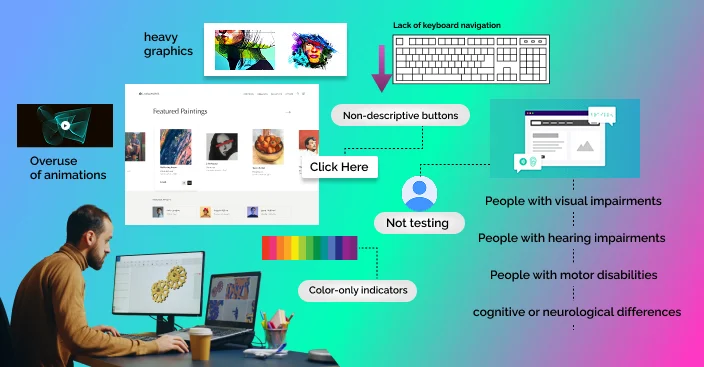
What Breaks Most Often on Real Websites for Users with Visual Impairments
Most accessibility failures are basic and repeat year after year, which shows why web accessibility must serve a diverse range of users, not only disability. The WebAIM Million analysis found WCAG failures on 95.9% of one million home pages, averaging 56.1 errors per page.
- Low contrast text (83.9% of home pages): set colour tokens that meet a 4.5:1 ratio for body text, because clear contrast is crucial for a person with low vision and supports universal design principles.
- Missing image alt text (53.1%): write short, meaningful alt text for informative images so visual content remains easily accessible.
- Missing form labels (51.0%): tie every input to a visible label as part of consistent accessibility standards.
- Empty links (46.3%): give every link descriptive text and follow established practices that improve navigation for more users.
- Empty buttons (30.6%): add a text label or accessible name to icon buttons, especially for people with visual impairments.
- Missing page language (13.5%): set the lang attribute on the < html> tag and support readable layouts with adjustable text sizes.
Two findings are worth noting for developers. First, pages that used ARIA had more errors on average (59.1) than pages without it (42), so use native semantic HTML first and add ARIA only where HTML can’t do the job. Second, platform averages vary: Shopify pages averaged 75.1 errors and Magento pages 75.8, against 56.1 overall. That reflects themes, apps and customisations as much as the platform, so it pays to test your own build whether you use Shopify, Magento, WooCommerce or BigCommerce. Diversity-aware design also improves the quality of the experience for more users.
Top Accessible Web Design Trends in Australia
1. AI-Assisted Personalisation, Used Carefully
AI can adapt interfaces to the individual, for example by remembering a preference for larger text or reduced motion, and by powering smarter search and support. See our guide to AI hyper-personalisation in Australian eCommerce and our AI personalisation services. Keep the control with the user, and treat AI as an addition to accessible code, not a replacement.
2. Voice Control and Speech Recognition
More people navigate by voice, including people with limited mobility. The practical step is making sure visible buttons and link labels match their accessible names, so a voice command like “click Add to cart” works. Clear headings and structured content also help voice assistants find answers.
3. Responsive, Device-Agnostic Design
Customers use phones, tablets, desktops, screen readers, switch devices and magnifiers, often in the same week. Design mobile-first, keep tap targets large enough, and test with assistive technology, not just browser resizing. Our mobile commerce development team builds with these checks in mind.
4. Inclusive UX Writing and Multilingual Support
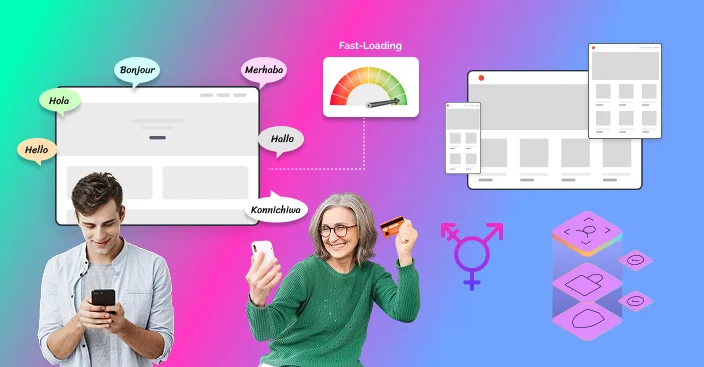
The Australian Government Style Manual advises writing to a Year 7 reading level, which makes content usable for most people. Use short sentences, plain words and clear error messages. For multicultural audiences, add translated pages with the correct language tags, and keep captions, transcripts and alt text accurate in every language.
5. Accessibility Built into the Design System
Leading teams now fix contrast, focus states and component behaviour once in the design system, so every new page inherits it. This is cheaper than patching pages one by one and fits composable and headless builds well.
6. Speed for Low-Bandwidth Users
Slow pages hit people on older devices, regional connections and assistive technology hardest. A content delivery network, compressed images and lean code improve access for rural and regional Australians as well as search performance.
What’s New in Web Content Accessibility Guidelines (WCAG) 2.2 for eCommerce Teams
WCAG 2.2 adds criteria that matter directly for online stores:
- Focus Not Obscured, Minimum (AA): sticky headers, cookie banners and chat widgets must not cover the keyboard focus.
- Dragging Movements (AA): sliders and drag-and-drop need a single-pointer alternative, such as buttons.
- Target Size, Minimum (AA): tap targets should be at least 24 by 24 CSS pixels, or have enough spacing.
- Consistent Help (A): keep help links, chat and contact details in the same place on every page.
- Redundant Entry (A): don’t make customers re-enter details already provided, such as shipping and billing.
- Accessible Authentication, Minimum (AA): allow password managers and avoid puzzle or memory-based logins.
An Accessible eCommerce Checklist
WCAG, the Web Content Accessibility Guidelines, provide practical checks that reflect evolving accessibility standards for eCommerce teams.
| Stage | Check | How to test |
|---|---|---|
| Navigation | Menus work by keyboard, and a skip link jumps to the main content | Tab through the page; for instance, confirm key paths work without a mouse |
| Product pages | Images have alt text, and size and colour options are labelled | Screen reader pass; review case studies such as BBC and Microsoft for patterns like adjustable text sizes |
| Search and filters | Filters announce their state and results count | Keyboard and screen reader |
| Cart | Quantity and remove controls have clear names | Keyboard only to confirm controls stay user friendly |
| Checkout forms | Visible labels, clear errors, autofill supported | Complete an order without a mouse, then run usability testing with people of varied abilities |
| Payments and login | No time limits that can’t be extended, no cognitive tests | Manual review |
| Content | Contrast of 4.5:1 for body text, captions on video | Contrast checker, video review |
Automated Tools, Overlays and Real Testing
Automated scanners such as axe-core, WAVE and Google Lighthouse are useful for catching common issues early, but they can’t judge everything, such as whether alt text is meaningful or a flow makes sense. Combine them with manual keyboard and screen reader checks, and test with disabled users. Research and usability testing with a diverse range of people can reveal issues internal reviews miss and provide valuable insights into real journeys.
Be wary of one-click “accessibility overlay” widgets. In 2025 the US Federal Trade Commission finalised an order requiring accessiBe to pay $1 million over claims that its AI tool could make any website WCAG compliant. Overlays can supplement a user-controlled settings panel, but they don’t replace fixing the underlying code.
- Automated scanning is fast and catches repeat issues, but finds only a portion of problems.
- Manual expert audits judge context and flows, but need skilled reviewers.
- User testing with disabled people finds real-world barriers, but needs recruitment and planning.
- Overlay widgets are quick to install, but don’t make a site compliant on their own.
- Source-code fixes are durable and compliant, but take development time.
For designers, this checklist supports usability testing by giving teams a practical instance of what to review on real journeys, and many accessible design case studies show these checks also improve a more user-friendly experience, from contrast and captions to adjustable text sizes.

How to Get Started: A 5-Step Design Process Plan
- Audit: run automated and manual checks against WCAG 2.2 AA to get a prioritised issue list. Research and usability testing with a diverse range of users produce valuable insights that automated tools miss.
- Fix the basics: contrast, alt text, labels, headings and keyboard focus are essential for usability.
- Fix the journey: checkout, search, account and forms, because inclusive design ensures fewer barriers while creating smoother experiences that protect revenue.
- Build it in: make accessibility part of your design and development process, and update your design system and QA checklists so new issues don’t appear as standards and practices evolve.
- Publish and monitor: add an accessibility statement and retest regularly with skilled reviewers such as designers or accessibility specialists.
If your platform makes this hard, accessibility can be a reason to look at replatforming. Our overview of the best eCommerce platforms is a useful starting point.
Conclusion
Accessible web design is about making digital experiences usable, fair and profitable. In Australia the benchmark is clear, the audience is large, and the same work prepares you for the EU and US markets. Brands that audit early, fix the basics, build accessibility into their design system and treat accessibility as an ongoing process will convert more customers and carry less risk. That approach supports inclusion and long-term benefits for users and the business, proving it is not just a trend.
Ready to make your website accessible for customers in Australia and overseas? Talk to our web design and development team about an accessibility audit and a build plan that protects both conversion and compliance.
FAQs
 Why is WCAG 2.2 useful for Australian brands?
WCAG 2.2 Level AA is the standard the Australian Human Rights Commission recommends for meeting the Disability Discrimination Act online, and it also covers the stricter technical standards used in the EU and US.
What are the most important accessibility trends for Australian eCommerce websites in 2025?
The most important of these trends is voice search functionality, dark mode functionality, screen reader functionality, accessible product descriptions, and navigation by keyboard alone—all to make eCommerce accessible to all.
Does the European Accessibility Act apply to Australian eCommerce businesses?
It can. The Act applies from 28 June 2025 to in-scope services, including eCommerce, offered to consumers in the EU, regardless of where the seller is based. Microenterprises providing services are exempt.
Are accessibility overlays enough to make a website compliant?
No. Overlays don’t fix underlying code, and the US Federal Trade Commission fined one provider $1 million over claims that its tool could make any website WCAG compliant.
What are the most important accessibility trends for Australian eCommerce websites?
The key trends are keyboard-friendly navigation, accessible product descriptions and checkout forms, voice control support, screen reader compatibility, plain-English content and fast, mobile-first design.
Does accessibility improve SEO?
Yes. Semantic headings, descriptive links, alt text, captions and fast pages help both users and search engines understand your content.
What is the business ROI of accessible UX in Australia?
Accessible sites reach a larger market, reduce friction in checkout, lower legal risk and build trust. Measure the return through conversion rate, bounce rate and support enquiries before and after fixes.
How do I test my website for accessibility?
Run automated tools like axe-core, WAVE and Lighthouse, then check keyboard navigation and a screen reader on key journeys, and include disabled users in testing.


